Allow Asymmetric Traffic on a Palo Alto Firewall
Asymmetric traffic is a situation where packets follow one path in one direction, but take a different path on the return trip.
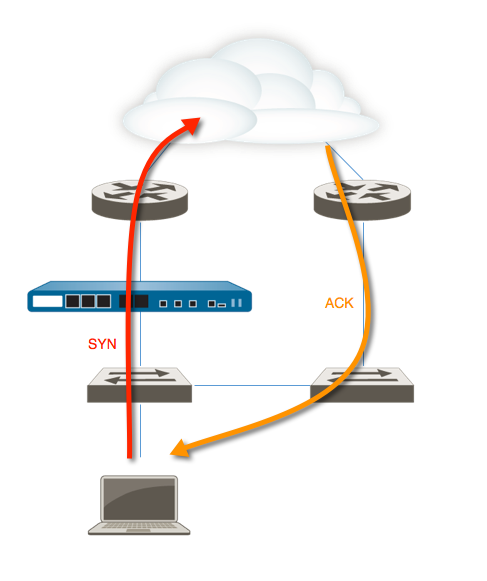
In general, an asymmetric configuration is normal in many network environments, and asymmetry prevents the firewall from seeing both directions of the flow. A Palo Alto firewall not only inspects sessions at Layer 7, but also inspects lower layers to verify that sessions are flowing as expected and have not been tampered with. A few checks that come into play when asymmetric routing is introduced include verifying that packets are received in the correct order, whether packets arrive within the sliding window, and whether the TCP handshake follows the proper sequence—meaning an ACK packet cannot be received before a SYN packet.
To verify which packets are being dropped because one of the conditions above is met, check for increases in the following counters:
tcp_drop_out_of_wnd   -> out-of-window packets dropped
tcp_out_of_sync       -> can't continue tcp reassembly because it is out of sync
flow_tcp_non_syn      -> Non-SYN TCP packets without session match
flow_tcp_non_syn_drop -> Packets dropped: non-SYN TCP without session match
For example, to view the “tcp_drop_out_of_wnd” counter, run the command:
show counter global name tcp_drop_out_of_wndWhich will display output like this:
Name:           tcp_drop_out_of_wnd
Value:          15977
Severity:       Warning
Category:       tcp
Aspect:         resource
Description:    out-of-window packets dropped
*Keep in mind that these drops will NOT appear in the traffic or threat logs.
Based on the traffic type, a Palo Alto firewall creates a sliding window starting from the last ACK received in a flow.
- The tcp_drop_out_of_wnd and tcp_out_of_sync counters increment when packets are received outside this time window.
- If received ACK packets do not match an existing session established by the TCP three-way handshake, the flow_tcp_non_syn and flow_tcp_non_syn_drop counters increment.
Both situations can occur simultaneously or at different intervals if the firewall sees only one direction of the session.
If the source zone of the asymmetric flow is unknown or spans all networks, these CLI commands can be used to disable TCP sanity checks:
> configure
Entering configuration mode
[edit]
# set deviceconfig setting tcp asymmetric-path bypass
# set deviceconfig setting session tcp-reject-non-syn no
# commit
If the source zone of the asymmetric flow is known—such as a newly added MPLS WAN connection—you can configure a Zone Protection profile to allow this malformed traffic from one or more specific zones while still performing TCP sanity checks for the other zones connected to the firewall.
This can be done by creating a Zone Protection profile under Network > Network Profiles > Zone Protection > Add > Packet Based Attack Protection > Reject Non-SYN TCP -> set to no and Asymmetric Path set to bypass.
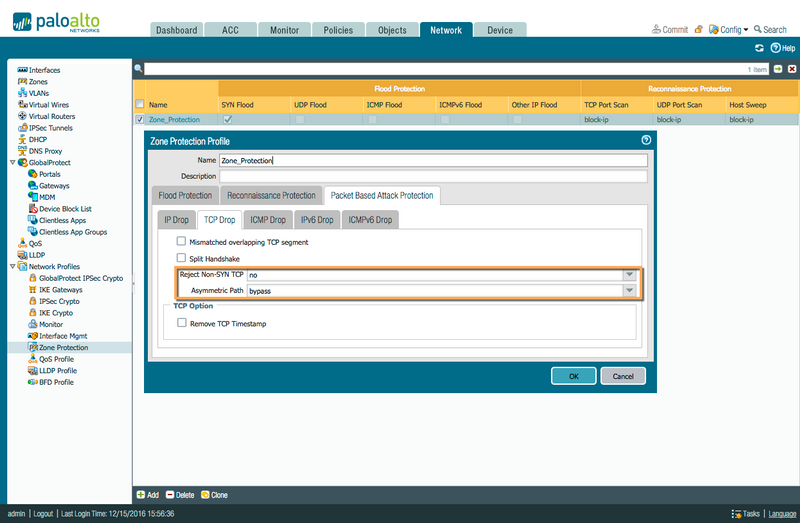
Assign this profile to the Zone where the asymmetric traffic originates.
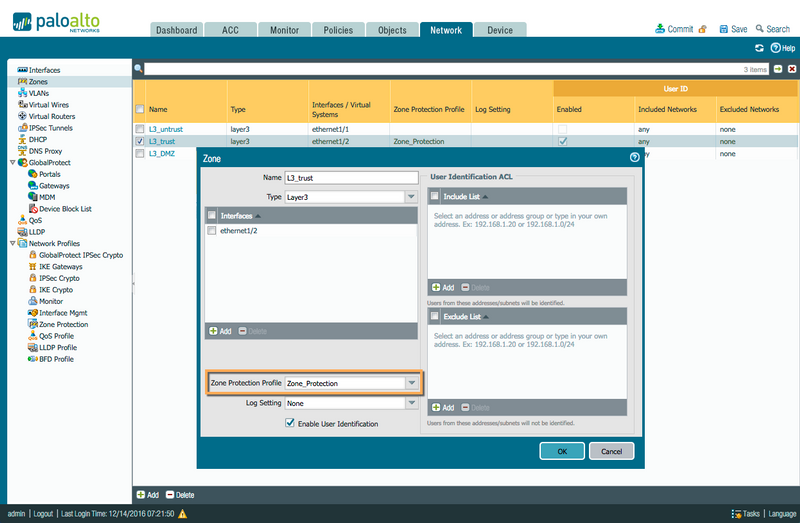
Once the global checks or the Zone Protection profile settings are enabled, the only counter that should increment is:
flow_tcp_non_syn
as this indicates that asymmetric routing has been detected, without any drop action being taken.
Keep in mind that disabling these checks introduces a security risk, as an attacker could inject packets that would normally be dropped. It is recommended to enable these options only for troubleshooting or as a temporary workaround.