Mastering Palo Alto Networks Packet Flow: Interactive PAN-OS Packet Flow Deck
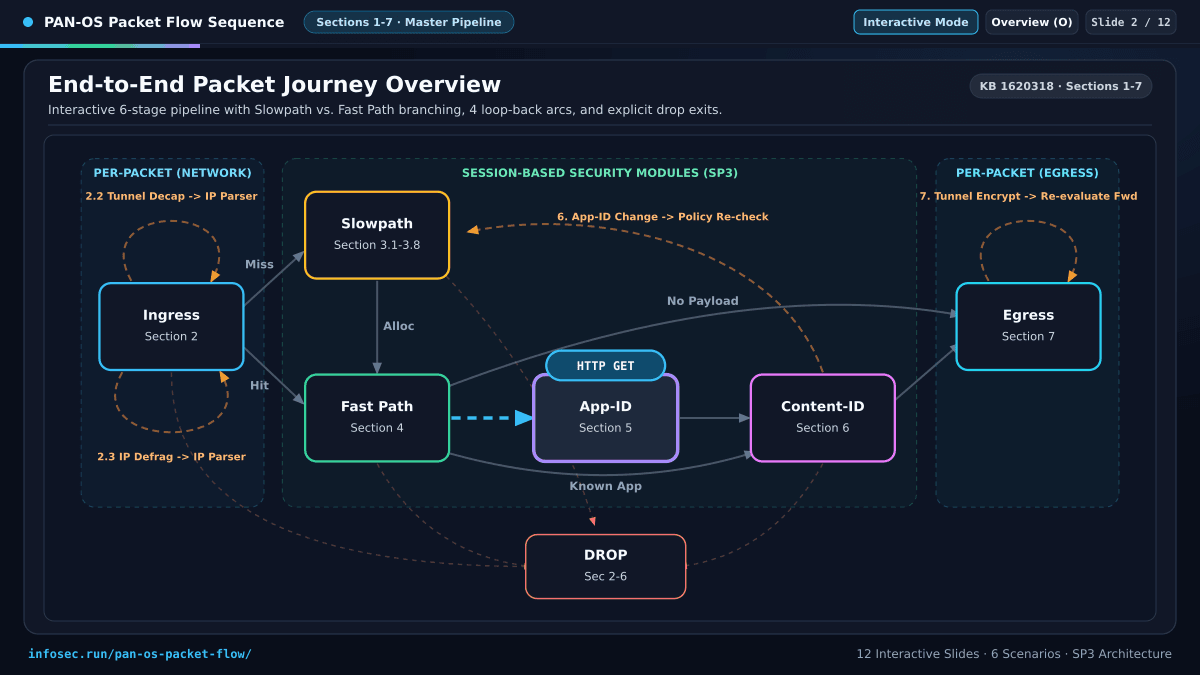
Understanding exactly what happens from the moment a packet enters a physical interface on a Palo Alto Networks firewall until it is forwarded (or dropped) makes all the difference when troubleshooting complex incidents, designing error-free security policies, and optimizing data plane performance.
To make visual learning and quick reference of this architecture easier, I have integrated a new interactive tool into the site: the PAN-OS Packet Flow deck and simulator.
What Does This Interactive Tool Include?
Unlike a traditional static diagram, PAN-OS Packet Flow walks step by step through the entire lifecycle of a packet and its session via 12 interactive slides and a real-time visual simulator:
- Animated 6-stage SVG pipeline: Visualize the complete flow across per-packet stages (Ingress in Section 2 and Forwarding / Egress in Section 7) and session-based modules (Slowpath 3.1–3.8, Fast Path in Section 4, App-ID in Section 5, and Content-ID in Section 6), along with explicit DROP / DISCARD paths.
- 6 real-world traffic scenarios: Select and trace step-by-step scenarios including New TCP/HTTP, Existing Fast Path, IPSec Tunnel, IP Fragmented, Dropped Fault, and SSL Decryption + App-ID Shift.
- Playback and speed controls: Step backward or forward (Step Back / Forward), run continuous animation (Play), and adjust playback speed (
0.5x,1x,2x). - 4 interactive loop-back arcs: Inspect how packets return to the IP parser or security policy during Tunnel Decapsulation (2.2), IP Defragmentation (2.3), Policy Re-evaluation on App-ID shift (6), and Egress Tunnel Encryption (7).
- Interactive and Presentation modes, Notes, and Shortcuts: Switch between interactive and presentation mode (
I), open speaker notes (N), browse the overview of all 12 slides (O), or view keyboard shortcuts (?).
Integrated Modules and Simulators
In addition to the master packet flow diagram, the deck includes dedicated interactive widgets covering the most critical (and frequently tested on certifications) PAN-OS topics:
- SP3 Architecture (Single Pass Parallel Processing): Compare single-pass software processing (parse once, classify once, inspect once) against hardware parallel acceleration and the separation between data plane and control plane.
- Ingress Drop Gates Inspector (Section 2.1): Explore and filter more than 22 non-configurable drop conditions across L2, IPv4, IPv6, TCP, and UDP, along with key diagnostic counters such as
flow_rcv_dot1q_tag_err. - Interface Modes Matrix (4×6) and 6-Tuple Explorer (C2S / S2C): Verify how L3, L2, Virtual-Wire, and Tap modes interact depending on packet type, and simulate how PAN-OS builds unidirectional C2S and S2C keys for TCP, ICMP, IPSec ESP, or unknown protocols.
- SYN Cookies vs. Random Early Drop (RED) Simulator: Adjust the SYN rate to compare RED’s random dropping against SYN Cookies’ 3-way handshake proxying with sequence number translation (and why Allow Non-SYN must never be enabled alongside SYN Cookies).
- Slowpath Explorer (3.1–3.8): Walk in detail through the 8 session-creation substages, highlighting that Security Policy (3.7) evaluates the packet pre-NAT with
App=ANYand the updated order since PAN-OS 7.0.2 / 6.1.7 (PAN-48644) where DoS Protection (3.6) is evaluated before Security Policy. - Session Lifecycle: Simulate real transitions between
INIT → OPENING → ACTIVE → HALF_CLOSED → TIME_WAIT → CLOSEDorDISCARD.
Who Is It Useful For?
- Security and Network Engineers: As a quick visual reference to understand at which exact stage NAT, routing, User-ID, SSL decryption, or threat inspection is applied.
- Palo Alto Networks Firewall Administrators and PCNSA / PCNSE Candidates: To solidify key exam concepts such as loop-backs, FIN/RST timers, pre-NAT policy evaluation, and the differences between Slowpath and Fast Path.
- SOC Analysts and Troubleshooting Teams: To quickly correlate packet-loss symptoms or sessions in
DISCARDstate with the corresponding global counters and substages.
Official Source and Technical Reference
The entire technical model, substage sequence (Sections 1 through 8), and data-plane behavior notes are based on official Palo Alto Networks documentation:
I invite you to try the simulator, walk through the scenarios step by step, and keep it handy during your next design or troubleshooting sessions.